校准多节点
此过程介绍了如何为拥有 8 张以上卡的多个 Intel® Gaudi® 节点执行校准。它需要在 Gaudi Pytorch 容器 中执行。
例如,我们使用 Llama 3.1 405B 模型,该模型运行在跨越两个 Intel® Gaudi® 2 节点的张量并行 16 模式下。
先决条件
开始之前
- 请熟悉 注意事项和建议。
- 确保多节点设置中的所有节点都连接到网络文件系统 (NFS) 挂载。
- 确保您拥有具有超过 8 张卡的节点配置。
校准过程
要执行校准,请按照 Gaudi Pytorch 容器 中的步骤进行操作。
-
按照 安装 过程构建并安装最新版本的 vLLM Intel® Gaudi® 硬件插件。
-
在 NFS 上创建工作区目录,克隆校准脚本存储库,并在校准目录中创建一个空的
quant_config_buffer.json文件。 -
在宿主机上(而不是容器内)使用以下命令检查所有 Intel® Gaudi® NIC 端口是否已启动并正在运行。
-
为所有节点设置以下环境变量,以验证入站和出站通信的网络接口。
-
启动一个 Ray 集群,该集群拥有足够多的节点以容纳所需的张量并行大小。
-
运行模型校准脚本。它将在指定的输出目录中创建校准测量文件,并为每个模型组织到子目录中。
-
可选地,您可以通过统一测量尺度来降低目标张量并行级别。例如,您可以对 Llama 3.1 405B 模型执行 FP8 校准,使用两个具有张量并行设置为 16 的 Intel® Gaudi® 2 节点,然后使用统一脚本将张量并行降低到 8。要实现此目的,您可以向
calibration_model.sh脚本添加可选的-r参数。此参数指定了统一测量的秩编号。例如,要将尺度从张量并行 16 转换为 8,请设置-r 8。./calibrate_model.sh -m meta-llama/Llama-3.1-405B-Instruct -d <path-to-dataset>/open_orca_gpt4_tokenized_llama.calibration_1000.pkl -o <nfs-path-to-calibration-output>/fp8_output -l 4096 -t 16 -b 128 -r 8如果您已经执行了校准,则可以使用
step-5-unify_measurements脚本来转换现有尺度,如下例所示。在这种情况下,必须将-m <path/ID>参数设置为包含测量文件的校准输出目录。python3 step-5-unify_measurements.py -r 8 -m <nfs-path-to-calibration-output>/fp8_output/llama-3.1-405b-instruct/g2/ -o <nfs-path-to-calibration-output>/fp8_output/llama-3.1-405b-instruct/g2/如果模型包含混合专家 (MoE) 层并且使用专家并行进行校准,请使用
-u参数根据专家并行规则统一原始测量结果,如下例所示 -
服务 FP8 量化模型。
MoE 模型高级使用建议
对于包含混合专家 (MoE) 的模型,例如 DeepSeek-R1,您可以执行一次校准,并在不同的专家并行和数据并行配置(例如 8、16 或 32 张卡)之间重用结果。此过程需要
- 将所有测量文件统一到一张卡上 (TP1)。
- 可选地,后处理统一的测量结果以提高性能。
- 将统一结果扩展到所需的专家并行卡数量。
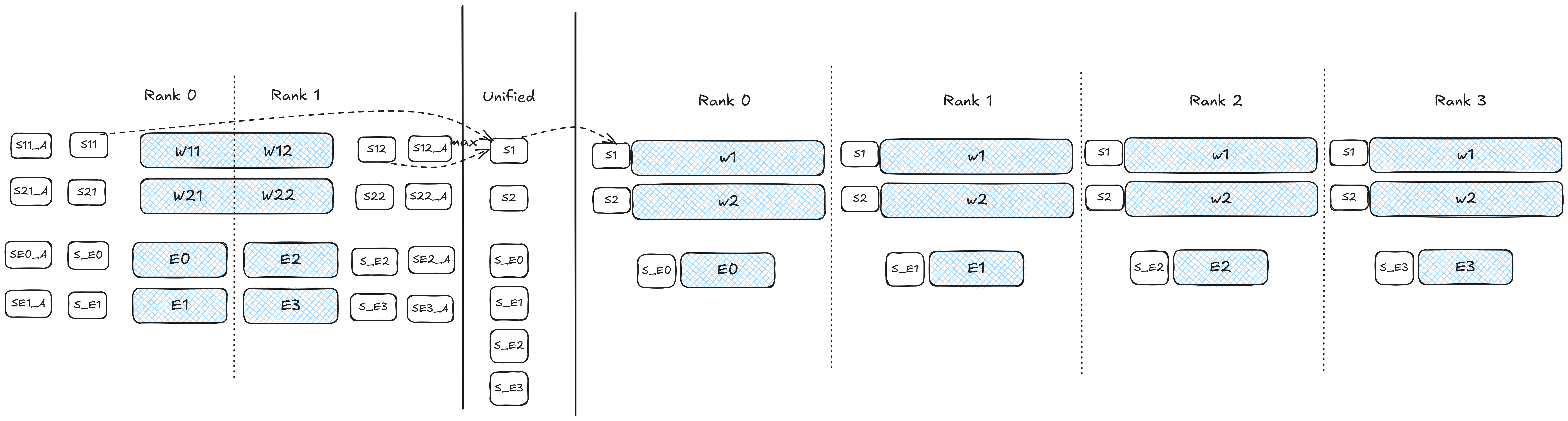
step-6-expand-measurements脚本将专家测量结果分发到目标卡数量,而其他值则被重用。
下图展示了一个在 2 张卡上进行校准并在 4 张卡上部署的示例。
以下示例演示了使用 DeepSeek-R1 在 8 张卡上进行校准,然后在 16 张和 32 张卡上部署。
# Unify measurements: TP8 -> TP1
python step-5-unify_measurements.py -m /path/to/measurements/deepseek-r1/g3/ -r 1 -o /path/to/measurements/deepseek-r1/g3-unified-tp1/ -u -s

# (Optional) Postprocess unified TP1
python step-3-postprocess-measure.py -m /path/to/measurements/deepseek-r1/g3-unified-tp1/ -o /path/to/measurements/deepseek-r1/g3-unified-tp1-post/ -d

# Expand to EP16TP1
python step-6-expand-measurements.py -m /path/to/measurements/deepseek-r1/g3-unified-tp1-post/ -o /path/to/measurements/deepseek-r1/g3-unified-tp1-post-expand-ep16 -w 16

# Expand to EP32TP1
python step-6-expand-measurements.py -m /path/to/measurements/deepseek-r1/g3-unified-tp1-post/ -o /path/to/measurements/deepseek-r1/g3-unified-tp1-post-expand-ep32 -w 32